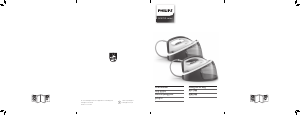
Panduan Philips GC3390 Setrika

Butuh manual untuk Philips GC3390 Setrika Anda? Di bawah ini Anda dapat melihat dan mendownload manual PDF dalam bahasa Indonesia secara gratis. Produk ini saat ini memiliki 5 pertanyaan umum, 0 komentar dan memiliki 0 suara. Jika ini bukan panduan yang Anda inginkan, silakan hubungi kami.

Apakah produk Anda rusak dan panduannya tidak memberikan solusi? Buka Repair Café untuk layanan perbaikan gratis.

Panduan

1 Make sure the appliance is unplugged.
2 Set the steam control to position 0.
3 Fill the water tank to the maximum level.
Do not pour vinegar or other descaling agents in the
water tank.
4 Set the temperature dial to MAX.
5 Plug in the appliance. If the appliance has an earthed
plug, put the mains plug in an earthed wall socket.
6 Unplug the iron when the temperature light goes
out.
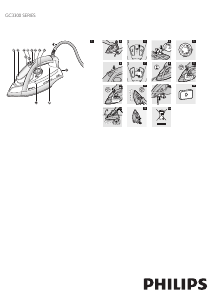
7 Hold the iron over the sink, press and hold the
Calc-Clean button and gently shake the iron to and
fro (Fig. 14).
Steam and boiling water come out of the soleplate.
Impuritiesandakes(ifany)areushedout.
8 Release the Calc-Clean button as soon as all the
water in the tank has been used up.
9 Repeat the Calc-Clean process if the iron still
contains a lot of impurities.

1 Put the plug back into the wall socket and let the
iron heat up to let the soleplate dry.
2 Unplug the iron when the temperature light goes
out.
3 Move the iron gently over a piece of used cloth to
remove any water stains that may have formed on
the soleplate.
4 Let the iron cool down before you store it.
Storage
1 Set the steam control to position 0, remove the
plug from the wall socket and let the iron cool
down.
2 Wind the mains cord round the cord storage
facility (Fig. 15).
3 Store the iron on its heel in a safe and dry place.

Do not throw away the appliance with the normal
household waste at the end of its life, but hand it in
at an ofcial collection point for recycling. By doing
this, you help to preserve the environment (Fig. 16).

If you need service or information or if you have a
problem, please visit the Philips website at www.philips.
com or contact the Philips Consumer Care Centre
in your country (you nd its phone number in the
worldwide guarantee leaet). If there is no Consumer
Care Centre in your country, go to your local Philips
dealer.
,
-

This chapter summarises the most common problems you could encounter with the appliance. If you are unable to
solve the problem with the information below, contact the Consumer Care Centre in your country.
Problem Possible cause Solution
The iron is plugged in, but the
soleplate stays cold.
There is a connection
problem.
Check the mains cord, the plug and the wall socket.
The temperature dial
is set to MIN.
Set the temperature dial to the required position
The iron does not produce any
steam.
There is not enough
water in the water
tank.
Fill the water tank (see chapter ‘Preparing for use’,
section ‘Filling the water tank).
The steam control is
set to position 0.
Set the steam control to a position between 1 and
4 (see chapter ‘Using the appliance’, section ‘Steam
ironing’).
The iron is not hot
enough and/or the
drip-stop function
has been activated
(specic types only).
Set an ironing temperature that is suitable for steam
ironing ( 2 to MAX). Put the iron on its heel and
wait until the amber temperature light goes out before
you start ironing.
Water droplets drip onto the
fabric during ironing.
The temperature
dial has been set to
a temperature that
is too low for steam
ironing.
Set an ironing temperature that is suitable for steam
ironing (temperature settings 2 to MAX). Put the
iron on its heel and wait until the amber temperature
light goes out.
You have put an
additive in the water
tank.
Rinse the water tank and do not put any additive in
the water tank.
You have not closed
the cap of the lling
opening properly.
Press the cap until you hear a click.
Flakes and impurities come out
of the soleplate during ironing.
Hard water forms
akes inside the
soleplate.
Use the Calc-Clean function one or more times (see
chapter ‘Cleaning and maintenance’, section ‘Calc-Clean
function’).
The temperature light ashes red
(specic types only).
The automatic shut-off
function has switched
off the iron (see
chapter ‘Features’).
Move the iron slightly to deactivate the automatic
shut-off function. The red auto-off indication of the
temperature light goes out.
Water drips from the soleplate
after the iron has cooled down
or has been stored (specic
types only)
You have put the iron
in horizontal position
while there was still
water in the water
tank.
Always set the steam control to position 0 and empty
the water tank after use. Store the iron on its heel.
The iron does not produce a
steam boost.
You used the steam
boost function too
often within a short
period.
Continue ironing in horizontal position and wait a
while before you use the steam boost function again..
The iron is not hot
enough.
Set an ironing temperature at which the steam boost
function can be used (temperature settings 2 to
MAX). Put the iron on its heel and wait until the
amber temperature light goes out before you use the
steam boost function.
4239.000.6595.3
3/9
Unduh panduan dalam bahasa Indonesia (PDF, 1.88 MB)
(Pertimbangkan lingkungan dan hanya cetak panduan ini jika benar-benar diperlukan)

Rating

Beri tahu kami pendapat Anda tentang Philips GC3390 Setrika dengan meninggalkan rating produk. Ingin berbagi pengalaman Anda dengan produk ini atau mengajukan pertanyaan? Silakan tinggalkan komentar di bagian bawah halaman.
Apakah Anda puas dengan Philips GC3390 Setrika?
Ya Tidak
Jadilah orang pertama yang menilai produk ini
0 pilihan

Bergabunglah dalam percakapan tentang produk ini

Di sini Anda dapat membagikan pendapat Anda tentang Philips GC3390 Setrika. Jika Anda memiliki pertanyaan, bacalah panduan dengan cermat terlebih dahulu. Meminta panduan dapat dilakukan dengan menggunakan formulir kontak kami.

Selengkapnya tentang panduan ini

Kami memahami bahwa menyenangkan memiliki panduan cetak Philips GC3390 Setrika Anda. Anda selalu dapat mengunduh panduan dari situs web kami dan mencetaknya sendiri. Jika Anda ingin memiliki panduan asli, kami sarankan Anda menghubungi Philips. Mereka mungkin dapat memberikan panduan asli. Apakah Anda mencari panduan untuk Philips GC3390 Setrika Anda dalam bahasa lain? Pilih bahasa pilihan Anda di beranda kami dan cari nomor model untuk melihat apakah kami menyediakannya.

Spesifikasi

Merek Philips
Model GC3390
Kategori Setrika
Jenis file PDF
Ukuran file 1.88 MB

Semua panduan untuk Philips Setrika
Lebih banyak panduan untuk Setrika

Pertanyaan umum tentang Philips GC3390 Setrika

Tim dukungan kami mencari informasi produk yang berguna dan jawaban atas pertanyaan umum. Jika Anda menemukan ketidakakuratan dalam pertanyaan umum kami, harap beri tahu kami melalui formulir kontak kami.

Bisakah saya membersihkan bagian bawah setrika dengan penggosok? Diverifikasi

Tidak, ini mungkin merusak bagian bawah. Gunakan kain lembab atau spons lembut untuk membersihkannya.

Ini sangat membantu (429) Baca selengkapnya

Apa perbedaan setrika uap dan setrika biasa? Diverifikasi

Keuntungan terbesar setrika uap adalah lebih mudah menghilangkan kerutan karena penggunaan uap. Sebaliknya, setrika biasa jauh lebih ringan dan seringkali lebih murah.

Ini sangat membantu (351) Baca selengkapnya

Sol setrika saya berubah warna, apakah saya masih bisa menyetrikanya? Diverifikasi

Hal ini mungkin saja terjadi, namun ada kemungkinan hal ini akan menular pada pakaian berwarna terang.

Ini sangat membantu (291) Baca selengkapnya

Bisakah saya menyetrika kancingnya? Diverifikasi

Tidak, ini akan merusak sol setrika dan mencegah setrika bekerja dengan benar. Jangan pernah menyetrika kancing, ritsleting, atau benda keras lainnya.

Ini sangat membantu (242) Baca selengkapnya

Ada goresan di bagian bawah setrika Philips saya, apakah saya masih bisa menggunakannya? Diverifikasi

Ya, ini tidak masalah. Bagian bawahnya terbuat dari beberapa lapisan dan tahan terhadap goresan ringan. Setrika akan tetap berfungsi sebagaimana mestinya.

Ini sangat membantu (67) Baca selengkapnya
Panduan Philips GC3390 Setrika

Produk-produk terkait

Kategori terkait

×
Download